How do Cloud Backends work?
A crash-course in cloud application backends for non-technical people
Backend. Microservice. Datacentre. Container. Virtualisation.
To the uninitiated, how cloud apps work can seem like Egyptian hieroglyphics. But rest assured, most of these terms have (relatively) straightforward definitions and in this post we’re going dig into how cloud applications work under the hood - specifically how their ‘backends’ work.
Well, as much as we can in a single article. Production-grade software engineering is a hugely complex subject, so this’ll be more a greatest hits than a deep dive, but it should outline the core intuitions and a bit of history.What exactly is ‘The Cloud’?
Further reading: AWS on cloud computing, Azure on cloud computing, GCP on cloud computing, Cloudflare on cloud computingCloud computing is where an app’s heavy lifting is done on a computer that’s not your device (i.e. your phone, tablet, laptop, etc.). The basic idea is your device (a ‘client’) contacts a ‘server’ (the other computer), asking a program running on it (a ‘service’) to perform some task and send back the results (‘serving’).
If you’ve ever heard the terms ‘frontend’ and ‘backend’, this is where they come from. The frontend is the client app on your device with the nice, user-friendly UI that you use. The ‘backend’ is what’s running on the server it connects to - the actual engine.
The term ‘cloud’ has been in use since at least the early 90s, originating from diagrams of computer systems where engineers would represent the internet with a cloud. The metaphor being that the servers being connected to are somewhat abstract: they exist somewhere, but where and how is someone else’s problem, they might as well be in the clouds.
Many of the apps you use every day are cloud-based:
- Search Engines (e.g. Google, Startpage, DuckDuckGo)Search engine indexes and results are stored, traversed and maintained on the cloud
- Email & Messaging (e.g. Outlook, Gmail, WhatsApp, Telegram)Emails & messages appear on your device but their delivery and/or storage is done by a server
- Social Media & Blogs (e.g. Instagram, Tiktok, Substack, Blogger, AO3)Media is uploaded, posts are sent to and feeds are generated by a server
- Cloud Storage (e.g. iCloud, Dropbox, MEGA)While it isn’t processing data, ultimately your data is held on a server
- Streaming (e.g. Netflix, BBC iPlayer, 4oD)The videos are on the server (unless you download one explicitly)
- Office Applications (e.g. Google Docs, Microsoft 365 Web)The apps run in-browser but everything is stored on-server, collaborative and sharing features are orchestrated by the server
- AI Models (e.g. ChatGPT, Midjourney)The LLM or Diffuser is on a server, as may be the agent harness that feeds it your question and orchestrates it using tools like web searches and reading PDFs
The list goes on: Deliveroo, Vinted, Hinge, CityMapper, even the Greggs app. If your app doesn’t work or keeps failing to sync when there’s no internet connection then it’s a cloud app as it’s dependent on a server somewhere.
Most web apps (i.e. a website that’s not just static content) are cloud applications. Not all though, outliers such as Photopea and JS Paint are served from the cloud (i.e. a server sends you them), but run entirely on your device once they’re loaded.
So how do they work?
Servers, Datacentres & Server OSs
Further reading: Lenovo on servers, IBM on datacentres, Red Hat on LinuxServers are computers. They have the same basic components as the one you have at home: a CPU, RAM, hard drive and so on.
The difference is they’re a lot beefier: the CPUs will be faster with more cores and there will be a lot more RAM. They’re also more resilient, with inbuilt failsafes like files being copied across multiple hard drives and error-correcting RAM that catches and fixes memory corruption before it can cause problems.
They also look different. Servers typically look like the images below, often described as ‘blades’ or ‘pizza boxes’:


Blades are often housed together in ‘enclosures’ and pizza boxes are stacked in ‘rackmounts’:
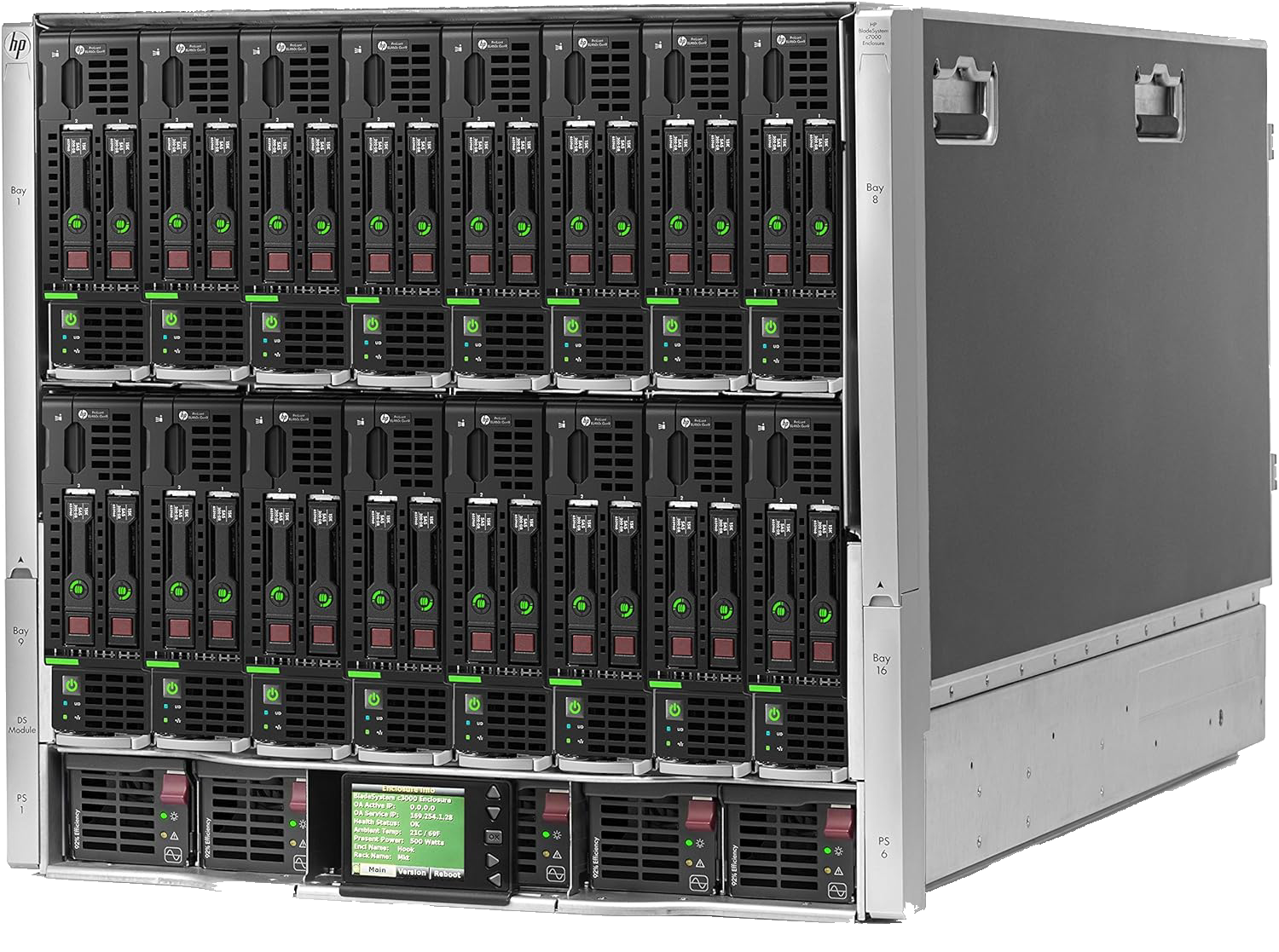

If you’ve heard the term ‘datacentre’, that’s a warehouse full of servers. When you see photos like this, rackmounts and enclosures are what’s behind the panels:

The operating systems that servers use are a bit different too. While the basic functionality is identical (i.e. run programs), they’re designed to squeeze more out of each CPU cycle and byte of RAM, and come pre-loaded with tools for networking, security, and keeping services running reliably around the clock.
Some server OSs may sound familiar: Windows Server is a version of the Microsoft OS you’ve likely used and Apple used to make macOS Server but stopped in 2022.
That said, the vast majority of servers run a Linux- or Unix-based OS like Red Hat Enterprise Linux, Debian, Ubuntu Server, SUSE or IBM AIX.
What are Linux and Unix?
Unix is an operating system created in Bell Labs in the 1970s. It has been incredibly influential and is a direct ancestor of most modern server operating systems as well as macOS and Android.
Linux is a Unix spin-off created by Linus Torvalds in the 1990s. It’s since grown to be the most popular Unix-derivative with a variety of ‘distributions’ such as Ubuntu, Debian, Mint, Fedora, Arch, RHEL and SUSE. There’s a website called Distrowatch which maintains a list of the most popular ones.
The reason there are so many Linuxes is because ‘Linux’, strictly speaking, only refers to the ‘kernel’ (the engine of the operating system). Each Linux distribution is a custom OS built on top of the Linux kernel with different parts such as different UIs to different file management systems. Users have free rein to modify their OS themselves too, there’s even a subreddit devoted to showing them off.
So what software do servers run? What do ‘backend apps’ look like?
What server software does
Confusingly, both the computer itself and the software running on it are called the ‘server’. In this article when I say ‘Server’ I mean the computer and when I mean the software I’ll say ‘backend app’.
To reiterate, the idea of the cloud is that a client (your device) asks a server to perform some task, often something that would be impractical to do on-device. This can be anything from emails to AI models:
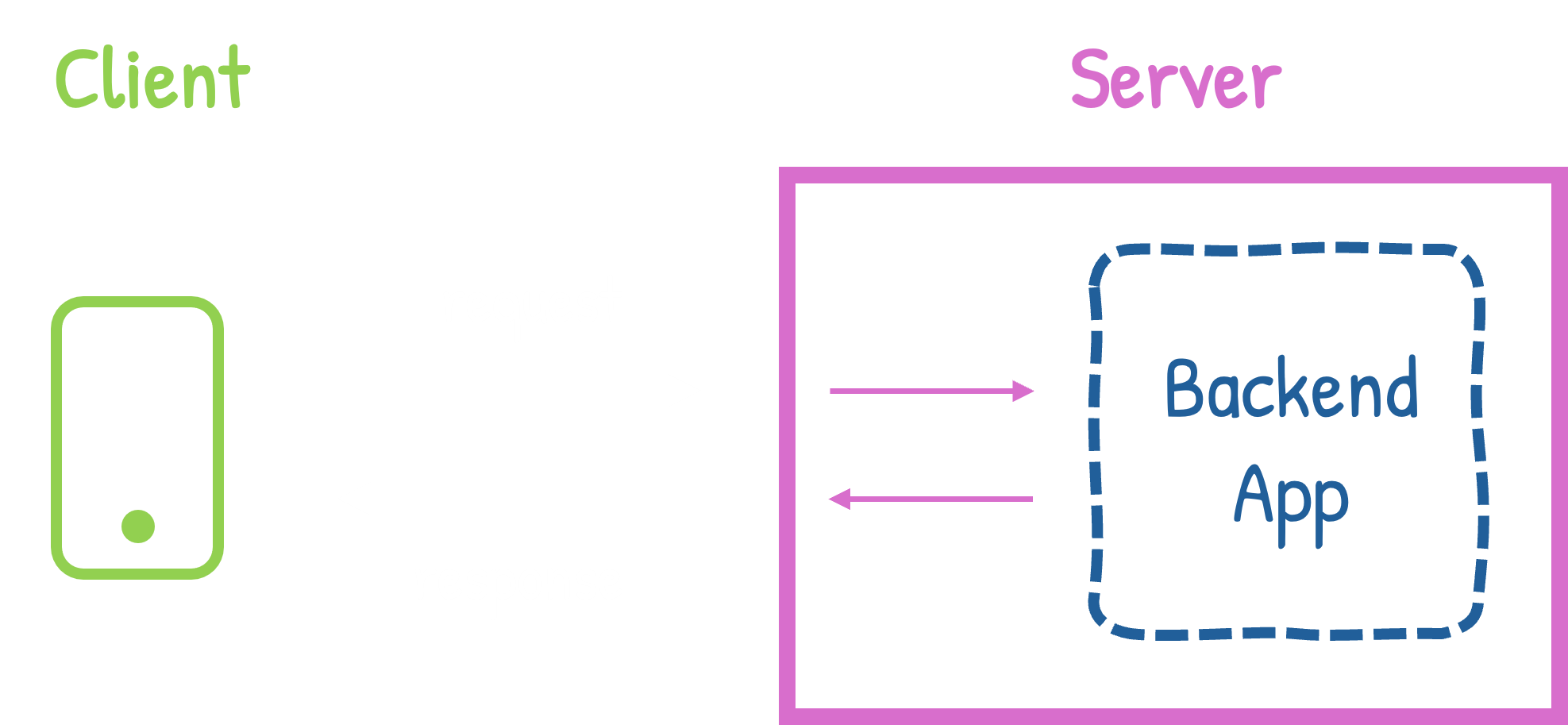
This is where the frontend/backend split becomes obvious. The ‘backend’ does the actual work, and the ‘frontend’ issues commands and displays the results to the user. As I said earlier, we’re going to focus on the ‘backend’ here.
The backend app is often known by another name: a ‘service’. A service is just a program that runs continuously, waiting for requests to come in (e.g. send an email, generate an image, find the nearest Mexican restaurant), executing them and sending back a response. Unlike the apps you use day-to-day which are loaded and then wiped from your device’s memory when closed, a service just sits there doing its job whenever called - hence the name.
Backend apps are usually composed of several services (you can think of each as a section of the backend app that handles some specific request).
They will also often handle requests from multiple clients at the same time. Exactly how many varies depending on the system, but individual services like nginx are designed to handle many 1000s per-instance and well-designed clusters of services can handle millions.
Hang on, ‘cluster’?
How server software works
Monoliths
The frontend apps you’re used to are single units. If you look inside a .app or in the installation folder of a .exe, you may see many parts (e.g. code broken into modules, helper libraries and assets), but the application operates as a single discrete unit.
This is a ‘monolithic’ architecture and is how most end-user and frontend apps work. In the early days of computing it was how most backend apps worked too: server software would be a single backend app equipped with all the services required to handle any request in-house. However, as the internet took off in the early 2000s, monolithic backends began to creak as the number of users they had to serve skyrocketed.
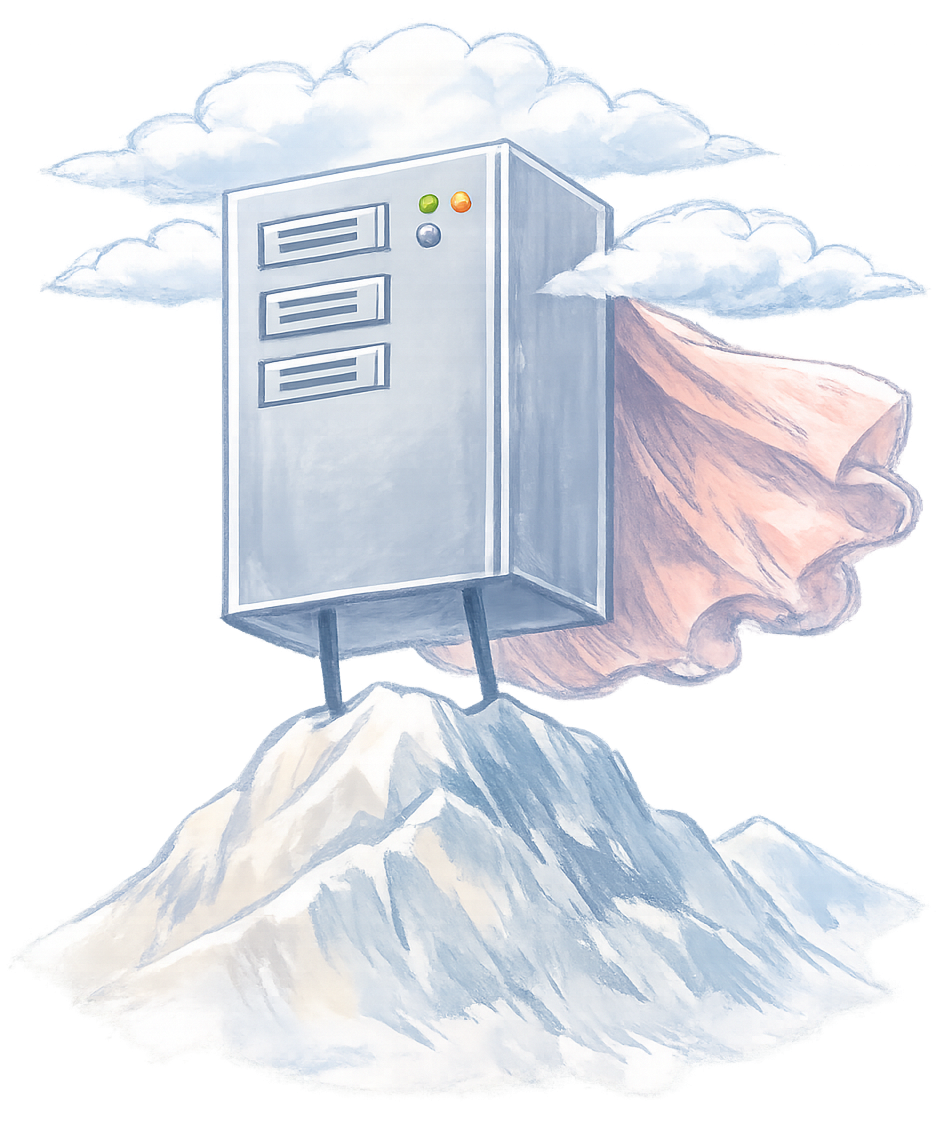
The initial fix was ‘vertical scaling’: faster CPUs and more RAM, but there’s a limit to how far that goes. Ultimately it’s still just one computer and while that computer can become really fast there’s only so many things even the fastest CPU can juggle at once.
A better fix turned out to be ‘horizontal scaling’. Most services don’t actually need powerful computers, in fact you can do most things on modest hardware. Better still, lots of low- or mid-spec servers can handle many more client requests in parallel than a single high-spec server simply because there are lots of them.
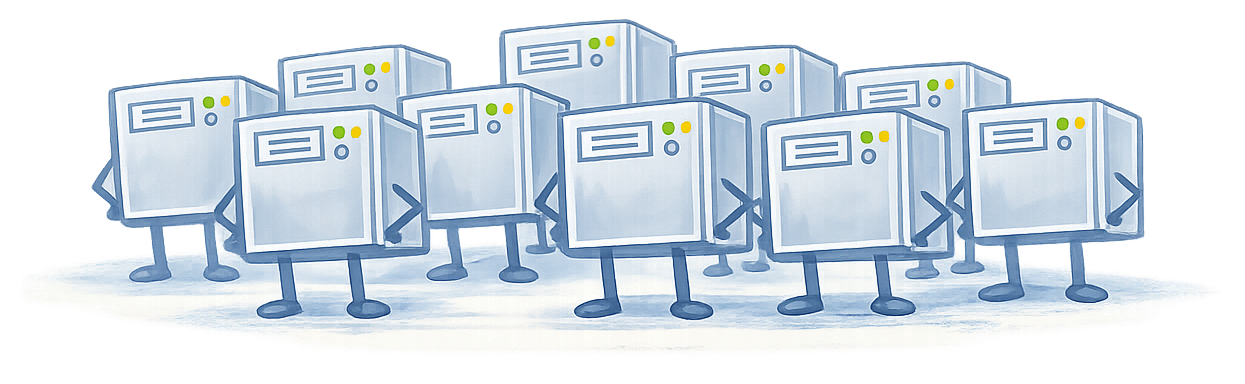
Horizontal scaling helped handle more requests at the same time, but one major issue remained: wastage.
Not all of a monolith is used the same amount. If your backend app is able to log users in, search for videos and stream them - it’s likely the ‘streaming service’ will be used a lot more than the ‘login service’.
This is a problem because even if you are horizontally scaling you still have to load the entire monolith:
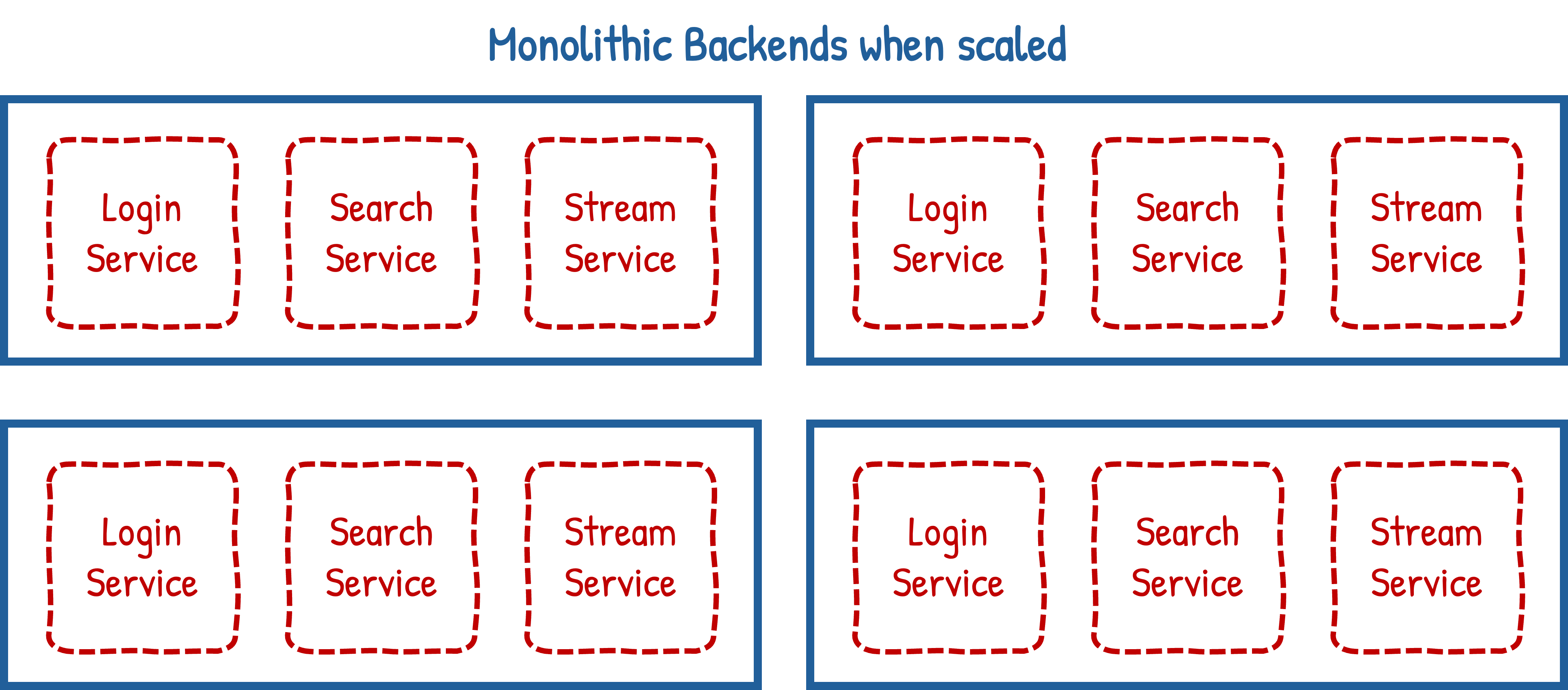
The diagram above only has three services per monolith, but production monoliths can have tens or even hundreds. Each service is loaded into memory and has to be maintained: taking up RAM space and eating CPU cycles with the money it costs to keep these unused services going offering little value in return.
Microservices
Further reading: AWS on microservices, Azure on microservices, GCP on microservices, Martin Fowler on microservicesAround the same time as horizontal scaling, ‘microservice’ architectures were developed.
The idea is that instead of having one single monolithic unit, you break it up into its individual component services and run each separately, with the collective system being called a ‘cluster’.
Within this article when I say ‘backend app’ I’m referring to the entire cluster. If I’m referring to an individual microservice I’ll call it that or just say ‘service’.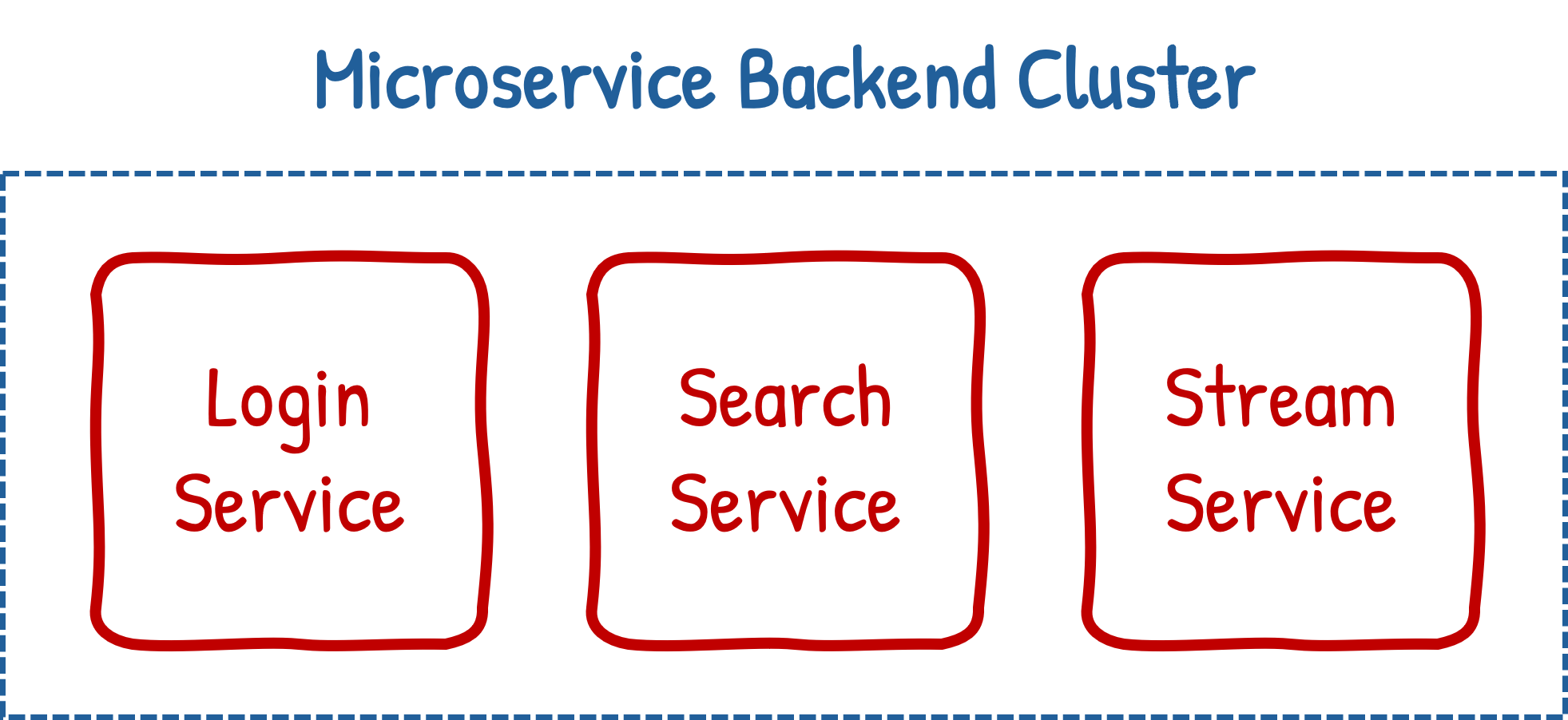
Now, if you need to handle more user activity, you need only spin up more microservices of the specific type needed, increasing capacity in a considerably more efficient manner:
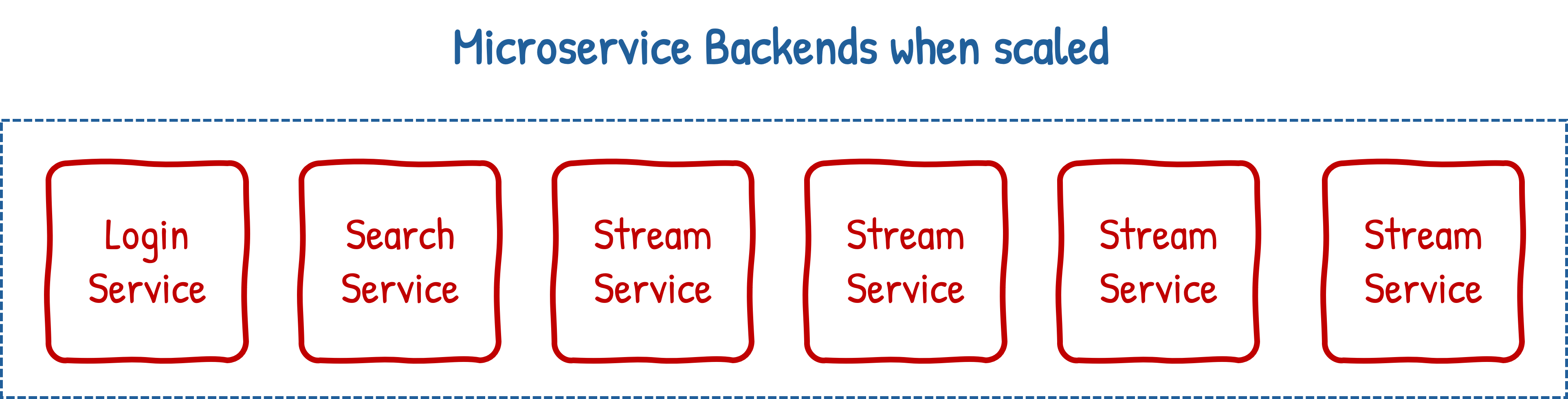
This can even be done dynamically, if there’s a sudden spike in user activity then extra replicas of a microservice can be created to help handle the load. When things calm down, those surplus microservices can be destroyed so compute resources aren’t wasted maintaining them. This elasticity, combined with the efficient use it bestows, is partly why microservices are the dominant approach to building backend applications today.
Going back to the last section: when I said ‘component’ and ‘system’, what you need to take away is that most cloud backend apps aren’t a single entity, but lots of tiny single-purpose components that all work together in a system to act as one entity.
It’s worth saying, microservices aren’t without their own issues. Monoliths might not scale efficiently, but they’re fundamentally easier to orchestrate and control simply by virtue of there only being the one of them. Every replicated microservice has to be wired up to any other service it depends on. If one critical microservice isn’t deployed properly or communication breaks down the entire cluster may be unusable.
Auxiliary Services
Further reading: AWS on databases, IBM on message queues, Cloudflare on caching, Cloudflare on load balancingMicroservices (and indeed modern monoliths) are normally ‘stateless’, meaning they don’t hold any information within themselves. Each time a request comes in they’ll retrieve any context needed and forget about it after they send the response.
As such, backend apps come with a supporting cast of auxiliary services. The full roster is a big subject but the usual suspects are:
- Databases (e.g. PostgreSQL, MySQL, MongoDB)Long-term memory. Since stateless services forget everything the moment they’ve replied, anything that needs to stick around lives here.
- Caches (e.g. Redis, Memcached)Short-term memory. Effectively a notepad for things that are slow to fetch or expensive to work out, so they don’t have to be redone on every request.
- Interservice communication (REST, gRPC, WebSockets)Not a component per se, but how services directly communicate. REST is the old faithful, gRPC is fast and allows complex payloads, WebSockets is bidirectional and for real-time.
- Message Queues (e.g. RabbitMQ, Kafka)Internal postal service. Lets one service contact another without having to wait for the response.
- Load Balancers & Gateways (e.g. nginx, Envoy)The front door. Takes incoming requests and spreads them across the available replicas so no single one gets swamped.
- Service Discovery (e.g. Consul, etcd, ZooKeeper)In a cluster where replicas are constantly created and destroyed, this is how services find each other without hardcoding an address that won’t exist in five minutes.
- Identity & Auth (e.g. Auth0, Keycloak, AWS Cognito)The bouncer. Handles authentication (proving who you are) and authorisation (checking you’re allowed to do the thing).
And then there’s monitoring - keeping an eye on the whole circus - which is what we’ll look at next.
Cloud Hosting
You can run your own datacentre, but typically this isn’t done unless you’re a large company, government entity or operate in a space where such a degree of separation or control is needed.
Instead, most backend apps are run on rented servers from a ‘cloud provider’ who ‘hosts’ your app. Amazon Web Services is the market leader, with Microsoft Azure and Google Cloud Platform following behind.
In fact, odd as it might sound, you might not rent a server per se but rather just part of one. To explain, there are various granularities or ‘models’ of cloud hosting you can get:
Infrastructure as a Service (IaaS)
Further reading: AWS on IaaS, Azure on IaaS, GCP on IaaS, Cloudflare on IaaSIaaS is where you rent raw compute power. But even within IaaS there are different things you can rent.
The most obvious manifestation is renting an entire physical machine (often called ‘bare metal’). But more commonly you can also rent part of one.
This means renting a ‘virtual machine’. VMs are exactly what the name suggests: virtual computers that, in their own eyes, fully exist. They run operating systems and have virtual RAM, hard drives and even virtual CPUs. This is called ‘virtualisation’ and if you’ve ever used software like VMware, Parallels or VirtualBox - this is what you were doing, just on a smaller scale.
Virtual machines are useful because they’re highly configurable and easy to set up:
Harking back to vertical scaling, if you don’t need the full power of a server’s hardware then don’t rent one, instead rent a modest virtual machine that lives, with other modest virtual machines, on a much faster one. If you decide your modest virtual machine needs to be less modest you can give it a faster CPU and more RAM by clicking a button - no need to open up a blade and swap chips out.
Similarly is the matter of setup. Once you’ve got a VM that’s to your liking you can create an ‘image’ (a copy) of it which you can use to replicate the VM to your heart’s content, not just on the original server but any other (even with totally different underlying hardware). Need to vertically scale? Need a test VM you don’t care about trashing? Something went wrong and you need to restore from backup? Create a new VM from the image!
You can actually go even more fine-grained with IaaS and rent individual pieces of hardware. Specialised providers like Lambda Labs and Hyperbolic let you rent graphics cards: you send them the work to be done and they’ll run it for you.
Platform as a Service (PaaS)
Further reading: AWS on PaaS, Azure on PaaS, GCP on PaaS, Cloudflare on PaaSPaaS is where you rent an environment that runs an application.
Just as with IaaS, you’re ultimately renting compute power somewhere. But PaaS abstracts what’s running the app away, instead you just say what you need to run the application: the programming language or runtime (e.g. Java, Python, NodeJS, Go, Rust, etc.) and any dependencies the code might have (code-specific libraries like Spring Boot or Django, system-level libraries like OpenSSL or ImageMagick as well as any configuration).
PaaS isn’t just restricted to runtimes either: Databases, Caches, Queues - anything auxiliary you need to build a backend app can be created with the cloud provider handling the underlying deployment and networking. You just tell it what to make and which services need to talk to each other.
The idea is to free you from worrying about the underlying plumbing, how a service is deployed or managed, so you can focus on the services themselves.
Containers
Further reading: AWS on containers, Azure on containers, GCP on containers, Docker overviewBut what if your runtime isn’t supported? What if you want more control?
Containers are a halfway-house between IaaS VMs and PaaS. Instead of virtualising an entire computer, you virtualise the environment a service runs in. This is usually what PaaS is actually doing under the hood - but now you’re in control.
Strictly speaking, containers aren’t actually virtualisation. They’re where the OS isolates a program and gives it its own file system so in that program’s eyes it feels like it’s in its own VM. But the net effect is the same - a sealed virtual environment that feels like its own.Much as with PaaS, it’s not just code you’re running. Auxiliary services can and frequently are containerised too.
The most popular containerisation software is Docker, this isolates and runs the containers. But to run whole backend apps you additionally use orchestration software like Kubernetes and Red Hat OpenShift which deploy and manage entire clusters of containers.
Containers offer many of the same benefits as fully fledged VMs: you create configurable, portable images that can be replicated to your heart’s content but they are considerably lighter weight. Intuitively you can think of containers and VMs as having a similar relationship to microservices and monoliths.
There’s something of a synergy between microservices, containers and horizontal scaling. While all three were independently developed and address different conceptual problems they work perfectly in tandem: allowing efficient allocation of resources while maintaining an abstraction that makes containers portable and easily deployable. In part this is why the approach has become so dominant.
Other ‘as a Service’ types and use in practice
Further reading: Salesforce on SaaS, IBM on FaaS, Cloudflare on BaaSLots of things get branded as ‘as a Service’, after all it is a marketing term that just means something is a provided service instead of owned. Others you might hear of are…
- Software as a Service (e.g. Slack, Google Docs, Dropbox, Adobe Creative Cloud)End-user software is delivered over the internet (and often hosted on it), usually on a subscription basis.
- Function as a Service (e.g. AWS Lambda, Google Cloud Functions, Azure Functions)Spinning up runtime environments to run small snippets of code, imagine containers but created on a per-block-of-code basis. You pay per-execution.
- Backend as a Service (e.g. Supabase, Firebase)Similar to PaaS but focused on a specific component, so you don’t need to write code to interact with it.
You can even get a server to swear at you with Fuck Off as a Service.
How much these are all used varies considerably. In practice, most real-world production applications are run on containers or IaaS systems. Early-stage prototypes and small-scale systems are often in PaaS and adoption of more specialised offerings (BaaS, FaaS, etc.) are use-case specific.
How server software is managed
Microservice or Monolith, PaaS or Container - services are written in code and that code has to get from a Software Engineer’s computer to the cloud somehow. This is called ‘deployment’.
Code rarely goes live straight away. Instead it progresses through multiple ‘environments’ which are isolated copies of the system for different stages of readiness. At each stage the code is tested and ‘promoted’ only when it is deemed safe. Typically this at least consists of:
- DevelopmentTesting area for changes before sharing them
- StagingNear-identical copy of production, used as a final check before going live
- ProductionThe actual system that actual users are using
The process of moving through each environment has a few common approaches:
- Rolling deploymentReplaces instances of services one at a time, keeping the others live throughout so users don’t notice.
- Canary deploymentThe updated service receives a small slice of real traffic first and is monitored closely - if it holds its own, the rollout continues; if not, it’s rolled back before most users are affected.
- Blue/green deploymentTwo identical environments (‘blue’ and ‘green’), with live traffic going to one while the other sits idle. Updates are deployed to the idle environment and tested, then traffic is switched over in one go - if anything goes wrong the switch is reversed instantly.
Deployments are the most common source of production incidents. Indeed there’s a tradition among software engineers that whoever among the team most recently broke the build is given the ‘rubber chicken of shame’.
The discipline that covers all of this: the act of building software with the act of running (operating) it, is called ‘DevOps’. Traditionally the fields were separate and rarely spoke - but DevOps represents a shift in philosophy where the team that builds a service is also responsible for keeping it alive.
Deployments & CI/CD
Further reading: Atlassian on CI/CD, Martin Fowler on continuous integration, Google SRE book: release engineeringMost of the deployment process is automated (although important actions like approving code and promoting it through stages are manual). What handles the process is a ‘deployment pipeline’: a series of automated steps the code passes through before it’s released. The two big halves are CI and CD:
- Continuous Integration (CI)When a developer pushes new code (attempting to ‘integrate’ it into the codebase), automated tests run. If they fail, the pipeline stops and the code goes no further - the idea is to catch problems as early as possible.
- Continuous Delivery/Deployment (CD)If the tests pass, the code is packed into a new container and deployed to the cluster.
Tools that run these pipelines include GitHub Actions, Jenkins and CircleCI.
Observability & Dashboards
Further reading: Honeycomb on observability, Red Hat on observability, Google SRE book: monitoring distributed systems, What is the ELK Stack?Backend apps don’t typically have nice looking UIs like the frontends of end-user apps. Instead they have ‘dashboards’ which visualise ‘observability’ data from the various services in the backend app’s cluster. That data comes in three forms: metrics, logs and traces, often called ‘the three pillars’:
Metrics are numbers over time: CPU usage, memory consumption, requests per second, error rates.
Logs are a timestamped running commentary the service writes as it runs - “received request”, “queried database”, “sent response”.
Traces track a single request as it travels through the cluster: which services it touched, in what order, and how long each step took. In a distributed system where a single user action might involve a dozen services, traces pinpoint exactly where something slowed down or broke.
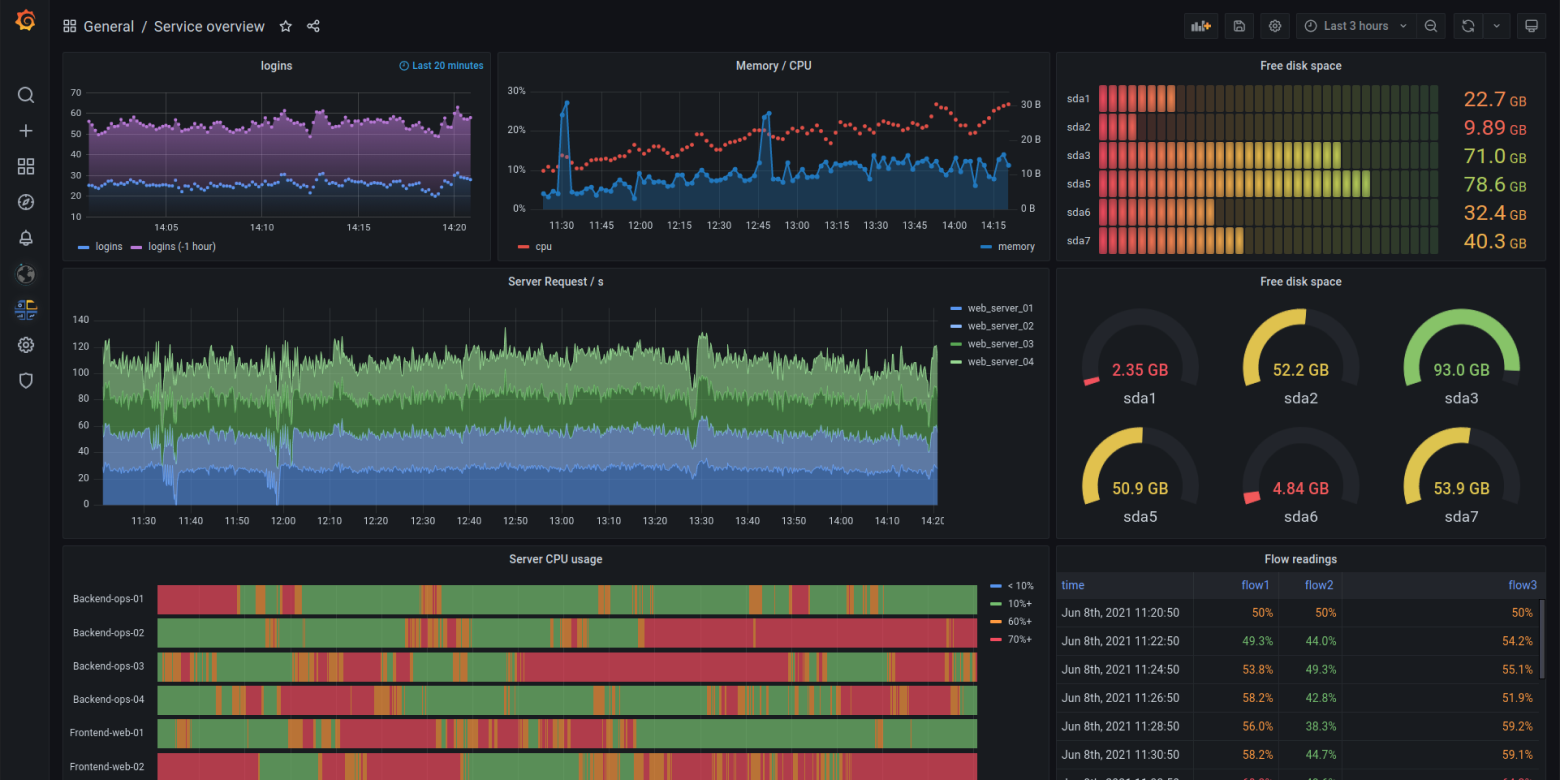
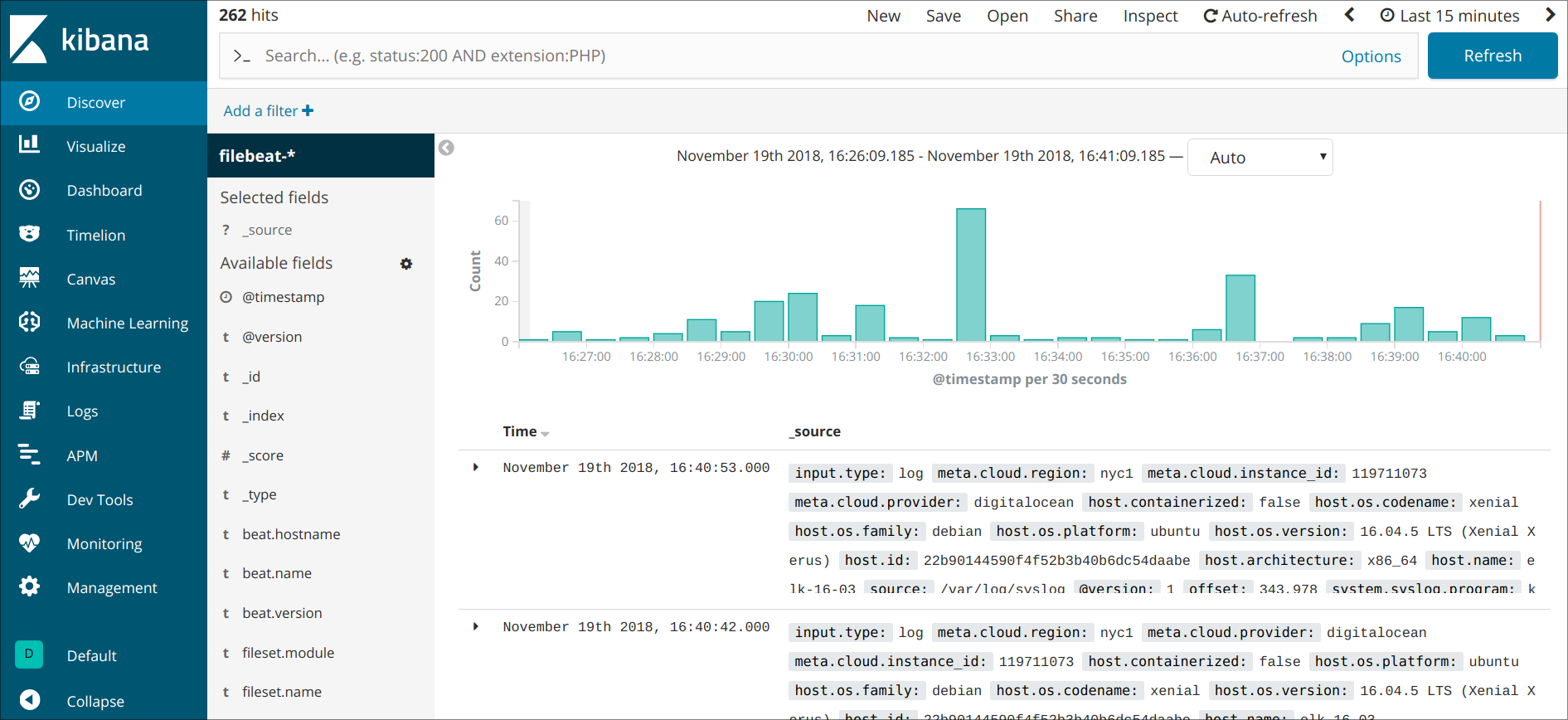
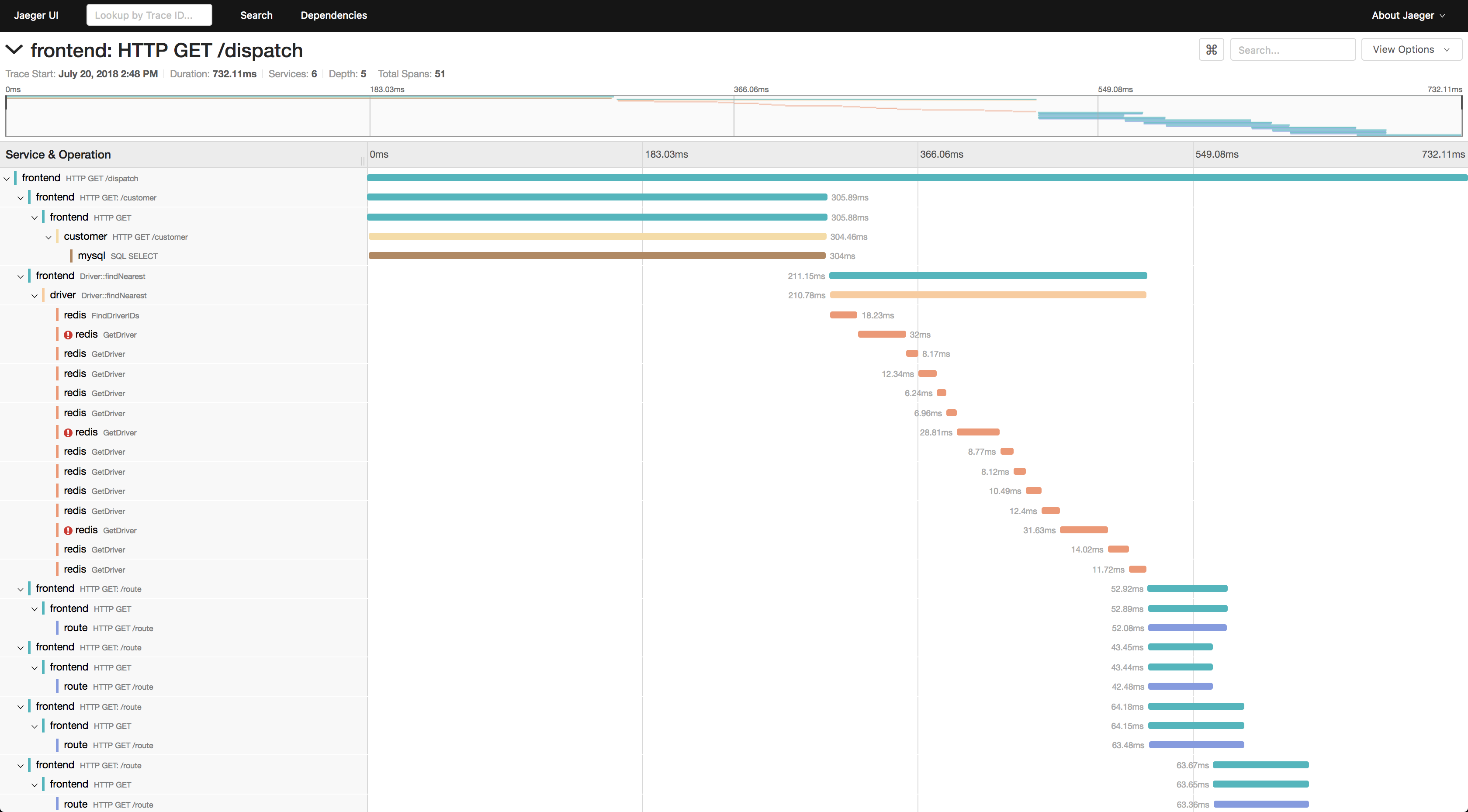
The trouble with dashboards is that they only tell you what’s happening when someone is actively looking at them. Most of the time, nobody is.
Alerts & Incidents
Further reading: Google SRE book: being on call, PagerDuty on incident responseAn alert is a rule applied to a metric, for example: “if service x’s error rate exceeds 5% for two minutes, notify someone”. The monitoring system watches the metrics continuously and fires the alert when a threshold is crossed.
Alerts go to a paging service like PagerDuty or OpsGenie, which notifies whoever is ‘on-call’: the first responder for that service at that moment. The on-call engineer investigates using dashboards, logs and traces. Tools like Jaeger, Zipkin or OpenTelemetry handle distributed tracing.
The whole situation - from alert to resolution - is called an ‘incident’. Once resolved, teams typically write a ‘postmortem’: a structured document covering what happened, the timeline, the root cause, and what changes will prevent a recurrence.
Service Level Objectives, Error Budgets & Service Level Agreements
Further reading: Google SRE book: service-level objectives, Atlassian on SLIs, SLOs and SLAs, Google on error budgetsA Service Level Objective is a target for how reliably a service should be, e.g. “99.9% of requests should succeed in under 200ms”. It’s how reliability gets defined precisely rather than left as a vague aspiration.
The gap between 100% and your SLO is your ‘error budget’: how much degradation you’re allowed before you’re in breach. If a team is burning through their budget fast, that’s a signal to slow down on new features and focus on stability; if it’s healthy, they can ship more aggressively.
While SLOs are internal targets, they have an impact on the real world due to ‘SLAs’ or Service Level Agreements. SLAs are parts of the contract you sign with customers. If you breach an SLA, there are usually (often financial) penalties.
Availability targets are usually expressed in ‘nines’: 99.9% is ‘three nines’, 99.99% is ‘four nines’. Far from marketing hype, these indicate specific quantities of downtime your system is allowed:
| Availability | Per year | Per month |
|---|---|---|
| 99% | 3 days 15 hrs | 7 hrs 18 min |
| 99.9% | 8 hrs 46 min | 43 min 50 sec |
| 99.99% | 52 min 36 sec | 4 min 23 sec |
| 99.999% | 5 min 16 sec | 26 sec |
| 99.9999% | 32 sec | 3 sec |
The big cloud providers (Amazon, Microsoft and Google) typically offer 99.5%–99.9% for single servers, with four nines (99.99%) if you spread across multiple availability zones.
Infrastructure as Code
Further reading: AWS on IaC, Azure on IaC, Red Hat on IaCIaC is where you define your cloud infrastructure with configuration files. What’s in these isn’t code like the sort used to write microservices but rather code that describes information, in formats like YAML or JSON.
These files are taken by an IaC tool like Terraform or OpenTofu, in tandem with configuration tools like Ansible, Chef or Puppet, which via your cloud provider’s APIs, will configure all the desired resources for you.
Now you don’t even have to manually click through your cloud provider’s UI. Jokes aside, this has some serious perks:
- ConsistencyManually setting up a cluster is boring. If someone forgets a setting or makes a change they don’t document, chaos ensues. IaC gives you the same cluster every time, no human error because it’s all defined in config files.
- ScalabilityIf setting up ten servers is boring imagine a hundred. With IaC, scaling from ten to a hundred is largely a case of changing a number in a file and re-running the tool
- ReproducibilityBecause your infrastructure is defined in a file, you can create an identical environment whenever and wherever. Testing environment? New locality? Disaster recovery? Re-apply that same config. No more “works on my machine” but for servers.
- Version controlConfig files are text, which means they can live in Git and have every change tracked. If something goes wrong you can easily pull up a previous working version and use that instead.
- AuditabilityBeing able to prove exactly what your infrastructure looks like and how it got there matters. An exact history of changes is a much better audit trail than “Harry did something six months ago.”
Why bother with Cloud?
Further reading: Azure on cloud migration benefits, GCP on cloud advantages, Oracle on cloud economics, VMware: The Complete Guide to Cloud Economics, Microsoft: The Economics of the Cloud (PDF)Why not just buy a server, install an OS and run services on it like you would a normal computer?
Many organisations do run their own datacentres or own their own bare metal. But even then a lot of the concepts I’ve mentioned (e.g. vertical scaling, VMs & Containers, microservices) are still used.
The reasons for this are simple: cost and flexibility.
Cost
Cost doesn’t just mean the price of the hardware. A physical server comes with a lot of expenses: power, cooling, physical space, network infrastructure - never mind the people needed to maintain it all. You also have to buy for your peak load: if your service spikes at Christmas and idles in February, you’re paying for that Christmas capacity year-round. In a few years, you’ll need to buy it all over again.
Cloud flips this into an operational expense. You pay for what you use, when you use it. Spin up a hundred servers for a big job, then shut them down. The bill reflects reality rather than worst-case planning.
Flexibility
Flexibility is the other side of that coin. Setting up a physical server takes time: there’s ordering it, shipping it, racking the blades, cabling them up and you still haven’t installed the OS and configured it! In the cloud, you can have a new server running in seconds from a few clicks. That speed changes what’s possible: teams can experiment cheaply; scale in response to demand, recover from failures and have clusters self-heal automatically; and deploy to multiple regions around the world without repeating the trials of Hercules each time.
There are plenty of valid reasons for owning and operating your own hardware - regulatory requirements, data sovereignty, very high and predictable workloads where the economics shift, or simply having the scale to make it worthwhile (large companies like Google and Meta run much of their own infrastructure for exactly this reason). But for most organisations, the cloud trades a large unpredictable cost for a smaller, flexible operational one, and that trade-off is usually worth it.
Conclusion
The cloud, stripped back, is just someone else’s computer. What makes it useful is everything layered on top: the way compute can be bought and scaled on-demand; the way applications can be deployed as clusters of independent microservice-bearing containers; the way those clusters can self-heal and autoscale and that all this can be described in code and deployed with a key press.
The same goes for the management layer: automated pipelines that test and ship code; dashboards and alerts that watch for trouble and wake the right person when they find it - all so that SLAs hold and whatever’s being offered ‘as a Service’ stays available.
Jargon bordering on hieroglyphics aside, none of this is magic. It’s precision design, engineering and architecture. And a shit load of caffeine.